


CONNECT
The more relevant your email, the more likely your audience is to respond. Mail Blaze email segmentation lets you use the data you already have to send more targeted campaigns, so every send reaches the people most likely to act on it.
No credit card required · Free AI credits to start
· A real person with you from day one
CONNECT
The more relevant your email, the more likely your audience is to respond. Mail Blaze email segmentation lets you use the data you already have to send more targeted campaigns, so every send reaches the people most likely to act on it.
No credit card required · Free AI credits to start
· A real person with you from day one
CONNECT
Send to the right people. Every time
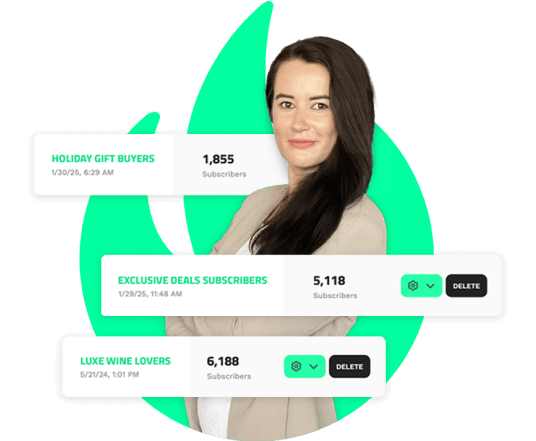
The more relevant your email, the more likely your audience is to respond. Mail Blaze email segmentation lets you use the data you already have to send more targeted campaigns, so every send reaches the people most likely to act on it.
No credit card required · Free AI credits to start
· A real person with you from day one
Targeted sends get better responses. It's that direct.
Sending the same email to your entire list treats every subscriber the same. Segmentation lets you send customised emails to distinct groups based on what you know about them, so the message you send is the message each segment actually wants to receive.
The result: more opens, more clicks, more of your audience taking the action that matters to your business. A segmented list isn't just better organised. It's more engaged.
Targeted sends get better responses. It's that direct.
Targeted sends get better responses. It's that direct.
Sending the same email to your entire list treats every subscriber the same. Segmentation lets you send customised emails to distinct groups based on what you know about them, so the message you send is the message each segment actually wants to receive.
The result: more opens, more clicks, more of your audience taking the action that matters to your business. A segmented list isn't just better organised. It's more engaged.
One condition or many. Your segments, your rules.
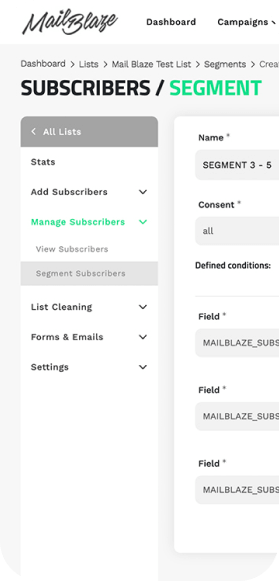
Every business has different data and different goals. Mail Blaze lets you build segments using a single condition or multiple combined conditions, so you can create exactly the audience slice that fits what you're trying to achieve.
Segment by location, purchase history, engagement level, custom fields, campaign behaviour, or any other data you hold at list level. The more precise your segment, the more relevant your send, and the more your audience responds.
One condition or many. Your segments, your rules.
Every business has different data and different goals. Mail Blaze lets you build segments using a single condition or multiple combined conditions, so you can create exactly the audience slice that fits what you're trying to achieve.
Segment by location, purchase history, engagement level, custom fields, campaign behaviour, or any other data you hold at list level. The more precise your segment, the more relevant your send, and the more your audience responds.
One condition or many. Your segments, your rules.
Every business has different data and different goals. Mail Blaze lets you build segments using a single condition or multiple combined conditions, so you can create exactly the audience slice that fits what you're trying to achieve.
Segment by location, purchase history, engagement level, custom fields, campaign behaviour, or any other data you hold at list level. The more precise your segment, the more relevant your send, and the more your audience responds.
Your unengaged subscribers, identified automatically.
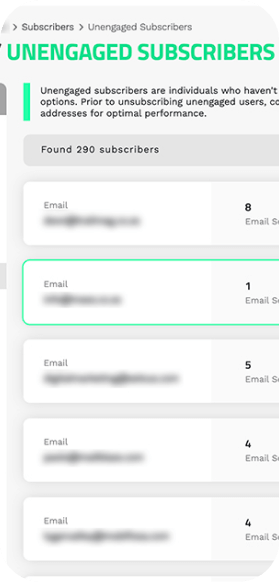
Mail Blaze includes a dedicated Unengaged subscriber segment at list level. This gives you a ready-made view of subscribers who haven't been opening or clicking, without having to build the segment manually each time.
Use it to create a win-back campaign and try to re-engage them, or remove them to keep your list quality sharp. Either way, you're making a deliberate decision about your audience rather than continuing to send to people who aren't responding. That protects your sender reputation and improves your overall engagement metrics.
Your unengaged subscribers, identified automatically.
Your unengaged subscribers, identified automatically.
Mail Blaze includes a dedicated Unengaged subscriber segment at list level. This gives you a ready-made view of subscribers who haven't been opening or clicking, without having to build the segment manually each time.
Use it to create a win-back campaign and try to re-engage them, or remove them to keep your list quality sharp. Either way, you're making a deliberate decision about your audience rather than continuing to send to people who aren't responding. That protects your sender reputation and improves your overall engagement metrics.
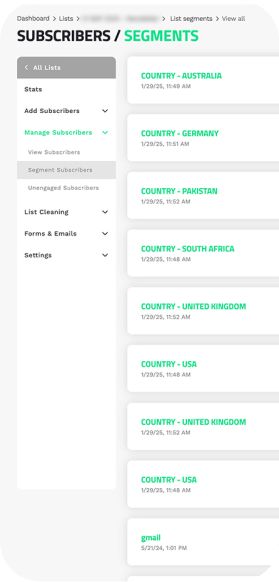
Know the size of your opportunity before you send.
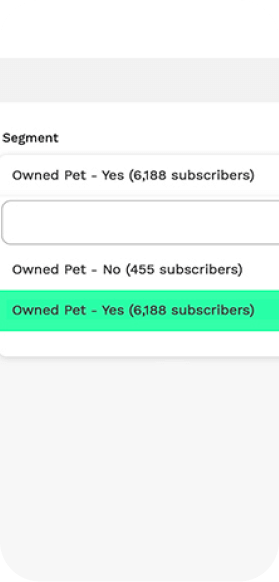
When you build a segment, you can see exactly how many subscribers match your criteria before you commit to a send. That visibility helps you make smarter decisions: is this segment big enough to warrant a dedicated campaign? Does combining another condition give you a tighter, more relevant audience?
Better data going in means better decisions coming out, and better decisions produce better engagement over time.
Know the size of your opportunity before you send.
When you build a segment, you can see exactly how many subscribers match your criteria before you commit to a send. That visibility helps you make smarter decisions: is this segment big enough to warrant a dedicated campaign? Does combining another condition give you a tighter, more relevant audience?
Better data going in means better decisions coming out, and better decisions produce better engagement over time.
Know the size of your opportunity before you send.
When you build a segment, you can see exactly how many subscribers match your criteria before you commit to a send. That visibility helps you make smarter decisions: is this segment big enough to warrant a dedicated campaign? Does combining another condition give you a tighter, more relevant audience?
Better data going in means better decisions coming out, and better decisions produce better engagement over time.
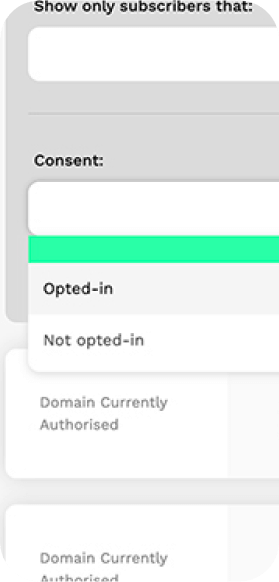
Only ever sending to opted-in subscribers. Always.
Mail Blaze only allows you to send campaigns to opted-in subscribers, so your audience is always people who consented to hear from you. The consent filter lets you create a segment to monitor how many subscribers have completed the full opt-in journey, from entering their email to verifying it via double opt-in.
Sending only to people who chose to be there isn't just good compliance practice. It's the foundation of a list that actually engages. Opted-in subscribers are more likely to open, click, and stay.
Only ever sending to opted-in subscribers. Always.
Only ever sending to opted-in subscribers. Always.
Mail Blaze only allows you to send campaigns to opted-in subscribers, so your audience is always people who consented to hear from you. The consent filter lets you create a segment to monitor how many subscribers have completed the full opt-in journey, from entering their email to verifying it via double opt-in.
Sending only to people who chose to be there isn't just good compliance practice. It's the foundation of a list that actually engages. Opted-in subscribers are more likely to open, click, and stay.
Why should I use segmentation?
Segmented campaigns consistently outperform non-segmented ones because the message is more relevant to the audience receiving it. More relevance means more opens, more clicks, and more of the actions that matter to your business. The more you know about your subscribers and use that knowledge to target your sends, the stronger your engagement becomes over time.
What types of segments should I create?
Start with your goal. If you want to drive purchases from recent buyers, create a segment of subscribers who purchased in the last 90 days. If you want to test location-specific messaging, create a segment by city. If you want to win back lapsed subscribers, use the built-in Unengaged segment. The most effective segments are built from the data you already have, applied to a specific campaign goal.
Can I use the same segment across multiple campaigns?
Yes. Any segment you create can be reused across as many campaigns as you need. Segments also update automatically based on current subscriber data, so a segment you built three months ago will reflect your list as it stands today when you next use it.
What happens if a subscriber no longer meets my segment criteria?
Segments are dynamic. If a subscriber's data changes and they no longer meet your criteria, they're removed from the segment automatically. This means your segments always reflect the audience that actually matches your conditions at the time of sending.
Does segmentation affect sending speed?
No. Segmentation has no impact on sending speed. Your campaign goes out at normal speed regardless of how complex or simple the segment conditions are.
How do I know if my segments are working?
Monitor your campaign metrics after each segmented send. You should see a lift in open rates, click-through rates, and conversion, compared to unsegmented sends. Mail Blaze's comparative filters let you compare segmented and non-segmented campaigns directly so you can see the difference clearly.
Why should I use segmentation?
Segmented campaigns consistently outperform non-segmented ones because the message is more relevant to the audience receiving it. More relevance means more opens, more clicks, and more of the actions that matter to your business. The more you know about your subscribers and use that knowledge to target your sends, the stronger your engagement becomes over time.
What types of segments should I create?
Start with your goal. If you want to drive purchases from recent buyers, create a segment of subscribers who purchased in the last 90 days. If you want to test location-specific messaging, create a segment by city. If you want to win back lapsed subscribers, use the built-in Unengaged segment. The most effective segments are built from the data you already have, applied to a specific campaign goal.
Can I use the same segment across multiple campaigns?
Yes. Any segment you create can be reused across as many campaigns as you need. Segments also update automatically based on current subscriber data, so a segment you built three months ago will reflect your list as it stands today when you next use it.
What happens if a subscriber no longer meets my segment criteria?
Segments are dynamic. If a subscriber's data changes and they no longer meet your criteria, they're removed from the segment automatically. This means your segments always reflect the audience that actually matches your conditions at the time of sending.
Does segmentation affect sending speed?
No. Segmentation has no impact on sending speed. Your campaign goes out at normal speed regardless of how complex or simple the segment conditions are.
How do I know if my segments are working?
Monitor your campaign metrics after each segmented send. You should see a lift in open rates, click-through rates, and conversion, compared to unsegmented sends. Mail Blaze's comparative filters let you compare segmented and non-segmented campaigns directly so you can see the difference clearly.
Go deeper on segmentation

Improve conversion rates by segmenting subscribers
Segmenting your lists in order to send recipients more pertinent emails is a good way to improve your subscriber's engagement with your campaigns.

7 simple email marketing segmentation techniques to try
Effective email marketing campaigns rely on email segmentation as a key component. It is common knowledge among marketers that segmenting email marketing lists can significantly raise open and clic...

How to Segment Your Email List by Engagement Level
Treating your whole email list the same is the single biggest driver of long-term disengagement. Here is how to segment by engagement and what to send to each group.
Go deeper on segmentation
Improve conversion rates by segmenting subscribers
Segmenting your lists in order to send recipients more pertinent emails is a good way to improve your subscriber's engagement with your campaigns.
7 simple email marketing segmentation techniques to try
Effective email marketing campaigns rely on email segmentation as a key component. It is common knowledge among marketers that segmenting email marketing lists can significantly raise open and clic...
How to Segment Your Email List by Engagement Level
Treating your whole email list the same is the single biggest driver of long-term disengagement. Here is how to segment by engagement and what to send to each group.
Improve conversion rates by segmenting subscribers
Segmenting your lists in order to send recipients more pertinent emails is a good way to improve your subscriber's engagement with your campaigns.
Improve conversion rates by segmenting subscribers
Segmenting your lists in order to send recipients more pertinent emails is a good way to improve your subscriber's engagement with your campaigns.
7 simple email marketing segmentation techniques to try
Effective email marketing campaigns rely on email segmentation as a key component. It is common knowledge among marketers that segmenting email marketing lists can significantly raise open and clic...
How to Segment Your Email List by Engagement Level
Treating your whole email list the same is the single biggest driver of long-term disengagement. Here is how to segment by engagement and what to send to each group.
Ready to send emails
your audience actually responds to?
Segmentation is included on every Mail Blaze plan.
Start your free trial and build your first segment today.
No credit card required · Free AI credits to start
· Real support from day one · 14 days free
Ready to send emails
your audience actually responds to?
Ready to send emails
your audience actually responds to?
Segmentation is included on every Mail Blaze plan.
Start your free trial and build your first segment today.
Segmentation is included on every Mail Blaze plan.
Start your free trial and build your first segment today.
No credit card required · Free AI credits to start
· Real support from day one · 14 days free