


CONNECT
touchpoint.
One place. On brand
Brand Hub is where you build and manage every form, page, and email in your subscription workflow. No dev work. No scattered assets. Just a consistent brand experience that gives your audience the confidence to engage.
No credit card required · All features included
· A real person with you from day one
Everything your subscription workflow needs, covered.
Subscription and unsubscription forms and pages
Campaign landing pages
Default workflow settings across your lists
Everything your subscription workflow needs, covered.
Subscription and unsubscription forms and pages
Campaign landing pages
Default workflow settings across your lists
Everything your subscription workflow needs, covered.
Subscription and unsubscription forms and pages
Campaign landing pages
Default workflow settings across your lists
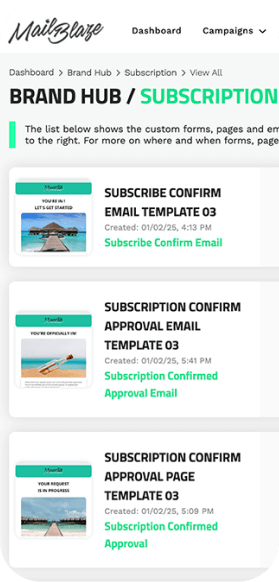
Your brand, held together across every touchpoint.
Every form, page, and email your subscriber encounters is a moment of connection. Brand Hub gives you one place to design and manage all of them, so your audience experiences a cohesive brand from the moment they sign up to the moment they open your next campaign.
Consistency builds familiarity. Familiarity builds trust. Trust is what turns a subscriber into someone who actually responds.
Your brand, held together across every touchpoint.
Every form, page, and email your subscriber encounters is a moment of connection. Brand Hub gives you one place to design and manage all of them, so your audience experiences a cohesive brand from the moment they sign up to the moment they open your next campaign.
Consistency builds familiarity. Familiarity builds trust. Trust is what turns a subscriber into someone who actually responds.
Your brand, held together across every touchpoint.
Every form, page, and email your subscriber encounters is a moment of connection. Brand Hub gives you one place to design and manage all of them, so your audience experiences a cohesive brand from the moment they sign up to the moment they open your next campaign.
Consistency builds familiarity. Familiarity builds trust. Trust is what turns a subscriber into someone who actually responds.
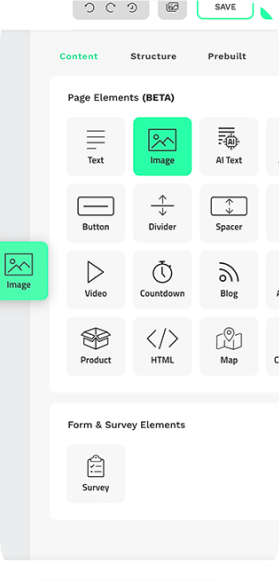
Drag, drop, and you're done. No developer required.
The Brand Hub drag-and-drop editor lets you design your entire subscription workflow without writing a line of code. Start from a template and customise it to match your brand, or build from scratch.
When you're happy with the design, the platform generates your embed code automatically. Copy it, paste it into your site, and it's live. If you'd prefer to host your forms and pages in the Mail Blaze environment, you can do that too. Either way, the choice is yours.
Drag, drop, and you're done. No developer required.
Drag, drop, and you're done. No developer required.
The Brand Hub drag-and-drop editor lets you design your entire subscription workflow without writing a line of code. Start from a template and customise it to match your brand, or build from scratch.
When you're happy with the design, the platform generates your embed code automatically. Copy it, paste it into your site, and it's live. If you'd prefer to host your forms and pages in the Mail Blaze environment, you can do that too. Either way, the choice is yours.
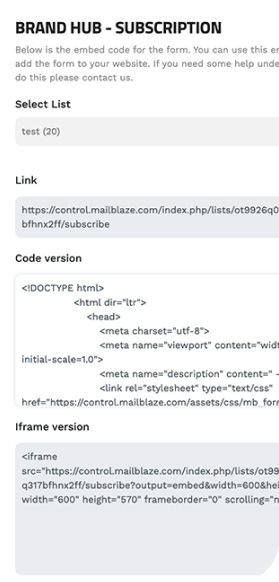
See the full subscriber journey. Adjust as you grow.
Brand Hub gives you a single view of every form, page, and email in your subscription workflow. As your audience grows and your campaigns evolve, you can refine each element without hunting across tools or briefing a developer every time something needs to change.
The more in control you are of that journey, the better your audience's experience. And a better experience means more engagement from the very first touchpoint.
See the full subscriber journey. Adjust as you grow.
Brand Hub gives you a single view of every form, page, and email in your subscription workflow. As your audience grows and your campaigns evolve, you can refine each element without hunting across tools or briefing a developer every time something needs to change.
The more in control you are of that journey, the better your audience's experience. And a better experience means more engagement from the very first touchpoint.
See the full subscriber journey. Adjust as you grow.
Brand Hub gives you a single view of every form, page, and email in your subscription workflow. As your audience grows and your campaigns evolve, you can refine each element without hunting across tools or briefing a developer every time something needs to change.
The more in control you are of that journey, the better your audience's experience. And a better experience means more engagement from the very first touchpoint.
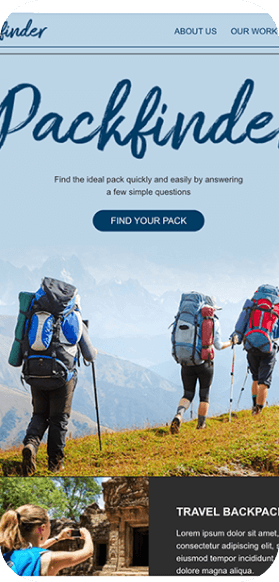
Landing pages that support your campaigns. No website access needed.
Not every team has the freedom to build pages directly on their website. Brand Hub's landing page builder gives you a dedicated space to create campaign-specific pages that are fully on brand and ready to convert.
Build the page, set it live in the Mail Blaze environment, and point your campaign at it. Every click from your email lands somewhere that continues the relationship, not somewhere that drops it.
Landing pages that support your campaigns. No website access needed.
Landing pages that support your campaigns. No website access needed.
Not every team has the freedom to build pages directly on their website. Brand Hub's landing page builder gives you a dedicated space to create campaign-specific pages that are fully on brand and ready to convert.
Build the page, set it live in the Mail Blaze environment, and point your campaign at it. Every click from your email lands somewhere that continues the relationship, not somewhere that drops it.
What can I build in the Brand Hub?
Everything your subscription workflow needs, in one place:
Subscription: Subscribe Form, Pending Subscribe Page, Subscription Confirmed Page, Subscription Confirm Email, Subscription Approval Page, Subscription Approval Email
Unsubscription: Unsubscribe Form, Unsubscription Confirm Page, Unsubscription Confirm Email
Profile: Update Profile Page
Campaigns: Landing Pages
Do I need any coding knowledge to use the Brand Hub?
No coding knowledge required to design and build in Brand Hub. When you're ready to embed your forms on your own website, the platform generates the code for you automatically. You copy it and paste it into the right place on your site, or hand it to your webmaster. If you'd prefer to host everything in the Mail Blaze environment instead, you can do that without touching any code at all.
My website is built on WordPress. How do I set up my subscription form?
Once you've installed and activated the Mail Blaze WordPress plugin, navigate to Mail Blaze in your WordPress account and select FORM from the sidebar. Add the fields you want, then go to the SETTINGS TAB and select the list you want subscribers added to. Save your changes and your form is connected. Full instructions are in our WordPress integration guide.
Can I preview everything before it goes live?
Yes. Every form, page, and email has a live preview link available once you've finished designing it. Check how everything looks and flows before publishing. If you're embedding on your own site, test it there too after pasting the code, since the Mail Blaze platform can't control how your site renders the embed.
Can I reuse designs I've already created?
Yes. Brand Hub is built to save you time, not create more work. You can reuse elements from previous designs using the prebuilt tab in the design pane, which lets you pull in campaigns and build templated structures from your existing work. The more you build, the faster it gets.
Does Brand Hub handle consent and GDPR?
Yes. The forms and pages you build in Brand Hub include dedicated GDPR content blocks and consent-specific features. For a full overview of how Mail Blaze handles consent across your lists and workflows, see our Consent Page.
What can I build in the Brand Hub?
Everything your subscription workflow needs, in one place:
Subscription: Subscribe Form, Pending Subscribe Page, Subscription Confirmed Page, Subscription Confirm Email, Subscription Approval Page, Subscription Approval Email
Unsubscription: Unsubscribe Form, Unsubscription Confirm Page, Unsubscription Confirm Email
Profile: Update Profile Page
Campaigns: Landing Pages
Do I need any coding knowledge to use the Brand Hub?
No coding knowledge required to design and build in Brand Hub. When you're ready to embed your forms on your own website, the platform generates the code for you automatically. You copy it and paste it into the right place on your site, or hand it to your webmaster. If you'd prefer to host everything in the Mail Blaze environment instead, you can do that without touching any code at all.
My website is built on WordPress. How do I set up my subscription form?
Once you've installed and activated the Mail Blaze WordPress plugin, navigate to Mail Blaze in your WordPress account and select FORM from the sidebar. Add the fields you want, then go to the SETTINGS TAB and select the list you want subscribers added to. Save your changes and your form is connected. Full instructions are in our WordPress integration guide.
Can I preview everything before it goes live?
Yes. Every form, page, and email has a live preview link available once you've finished designing it. Check how everything looks and flows before publishing. If you're embedding on your own site, test it there too after pasting the code, since the Mail Blaze platform can't control how your site renders the embed.
Can I reuse designs I've already created?
Yes. Brand Hub is built to save you time, not create more work. You can reuse elements from previous designs using the prebuilt tab in the design pane, which lets you pull in campaigns and build templated structures from your existing work. The more you build, the faster it gets.
Does Brand Hub handle consent and GDPR?
Yes. The forms and pages you build in Brand Hub include dedicated GDPR content blocks and consent-specific features. For a full overview of how Mail Blaze handles consent across your lists and workflows, see our Consent Page.
Ready to build a subscriber
experience that earns
engagement?
Start your free trial and get access to Brand Hub, and every other
feature Mail Blaze offers, from day one.
No credit card required · All features included
· Real support from day one · 14 days free
Ready to build a subscriber
experience that earns
engagement?
Ready to build a subscriber
experience that earns
engagement?
Start your free trial and get access to Brand Hub, and every other
feature Mail Blaze offers, from day one.
Start your free trial and get access to Brand Hub, and every other
feature Mail Blaze offers, from day one.
No credit card required · All features included
· Real support from day one · 14 days free
Want to see it in action first?
Book a demo and we'll walk you through Brand Hub and everything else
Mail Blaze can do for your team. No pitch deck, no pressure. Just a real
conversation about your goals.
Want to see it in action first?
Want to see it in action first?
Book a demo and we'll walk you through Brand Hub and everything else
Mail Blaze can do for your team. No pitch deck, no pressure. Just a real
conversation about your goals.
Book a demo and we'll walk you through Brand Hub and everything else
Mail Blaze can do for your team. No pitch deck, no pressure. Just a real
conversation about your goals.
2026 © Mail Blaze. All rights reserved.