


Cultivate
Mail Blaze reporting gives you a comprehensive view of performance across campaigns, automations, transactional emails, surveys, and list cleaning. Not just what happened, but enough to understand why, and what to do differently next time.
No credit card required · Free AI credits to start
· A real person with you from day one
Cultivate

Mail Blaze reporting gives you a comprehensive view of performance across campaigns, automations, transactional emails, surveys, and list cleaning. Not just what happened, but enough to understand why, and what to do differently next time.
No credit card required · Free AI credits to start
· A real person with you from day one
Cultivate
You cannot improve engagement you cannot measure
Mail Blaze reporting gives you a comprehensive view of performance across campaigns, automations, transactional emails, surveys, and list cleaning. Not just what happened, but enough to understand why, and what to do differently next time.
No credit card required · Free AI credits to start
· A real person with you from day one
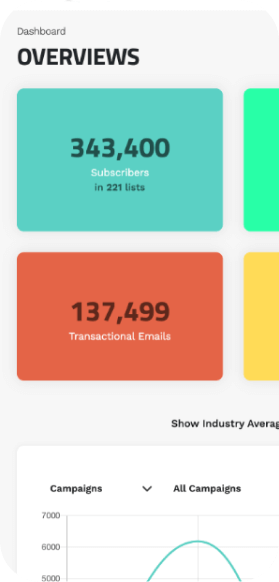
Your whole account at a glance. Always current.
The Mail Blaze dashboard gives you an account-level view of what is happening across your lists, campaigns, templates, automations, surveys, transactional sends, and forms. Filter by predefined metrics to narrow the view to what matters most right now.
The bigger picture matters. A dashboard that is clear and current means you always know where your engagement is trending, not just how a single campaign performed.
Your whole account at a glance. Always current.
Your whole account at a glance. Always current.
The Mail Blaze dashboard gives you an account-level view of what is happening across your lists, campaigns, templates, automations, surveys, transactional sends, and forms. Filter by predefined metrics to narrow the view to what matters most right now.
The bigger picture matters. A dashboard that is clear and current means you always know where your engagement is trending, not just how a single campaign performed.
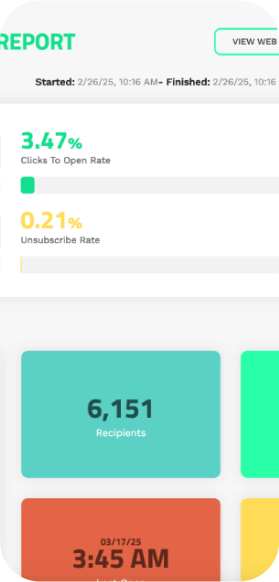
Drill into every campaign. Know what drove the result.
Every sent campaign has a detailed report covering opens, unique opens, clicks, clicks-to-open rate, bounce rate, unsubscribes, and more. Review the full breakdown to understand what worked and where there is room to improve.
We recommend reviewing campaign-level reporting at least 72 hours after sending, giving your audience enough time to open and take action before you draw conclusions. The data you act on should be the data that is settled.
Drill into every campaign. Know what drove the result.
Every sent campaign has a detailed report covering opens, unique opens, clicks, clicks-to-open rate, bounce rate, unsubscribes, and more. Review the full breakdown to understand what worked and where there is room to improve.
We recommend reviewing campaign-level reporting at least 72 hours after sending, giving your audience enough time to open and take action before you draw conclusions. The data you act on should be the data that is settled.
Drill into every campaign. Know what drove the result.
Every sent campaign has a detailed report covering opens, unique opens, clicks, clicks-to-open rate, bounce rate, unsubscribes, and more. Review the full breakdown to understand what worked and where there is room to improve.
We recommend reviewing campaign-level reporting at least 72 hours after sending, giving your audience enough time to open and take action before you draw conclusions. The data you act on should be the data that is settled.
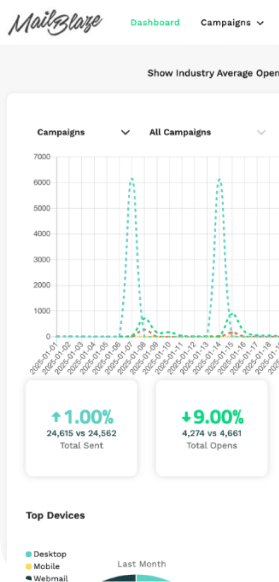
Compare campaigns directly. Find what drives engagement.
Comparative filters let you compare campaigns against each other across key metrics: open rates, clicks, clicks-to-open, and more. Put your best and worst performing campaigns side by side and you can see exactly what changed between them.
Subject line, send time, audience, content approach: when you can compare directly, patterns become visible. Replicate what drove engagement. Stop repeating what did not.
Compare campaigns directly. Find what drives engagement.
Compare campaigns directly. Find what drives engagement.
Comparative filters let you compare campaigns against each other across key metrics: open rates, clicks, clicks-to-open, and more. Put your best and worst performing campaigns side by side and you can see exactly what changed between them.
Subject line, send time, audience, content approach: when you can compare directly, patterns become visible. Replicate what drove engagement. Stop repeating what did not.
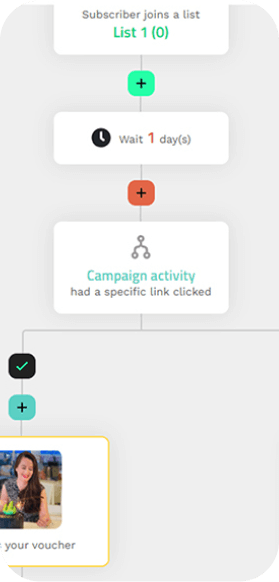
See where your audience is in every workflow. And act on it.
Automation reporting shows you step-by-step performance across your workflows: where subscribers are in the journey, what actions they are taking, and where they are dropping off. Compare automations against each other to see which workflows are driving engagement and which need refinement.
Automation is most valuable when it compounds. Reporting is how you make each workflow better with every iteration.
See where your audience is in every workflow. And act on it.
Automation reporting shows you step-by-step performance across your workflows: where subscribers are in the journey, what actions they are taking, and where they are dropping off. Compare automations against each other to see which workflows are driving engagement and which need refinement.
Automation is most valuable when it compounds. Reporting is how you make each workflow better with every iteration.
See where your audience is in every workflow. And act on it.
Automation reporting shows you step-by-step performance across your workflows: where subscribers are in the journey, what actions they are taking, and where they are dropping off. Compare automations against each other to see which workflows are driving engagement and which need refinement.
Automation is most valuable when it compounds. Reporting is how you make each workflow better with every iteration.
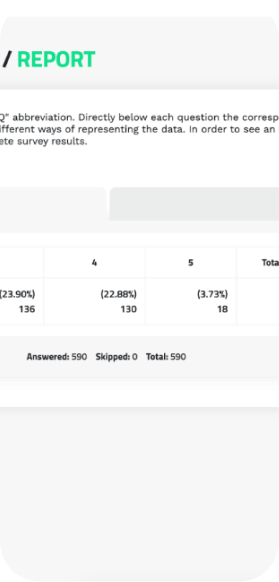
Your survey responses, clearly presented and ready to export.
Survey reporting gives you two distinct views of the responses gathered through any survey you send. See what the data reveals at a glance, or export the full response set to use however your team needs it.
Asking your audience something is only half of the engagement loop. The other half is understanding what they told you and acting on it. Survey reporting closes that loop.
Your survey responses, clearly presented and ready to export.
Your survey responses, clearly presented and ready to export.
Survey reporting gives you two distinct views of the responses gathered through any survey you send. See what the data reveals at a glance, or export the full response set to use however your team needs it.
Asking your audience something is only half of the engagement loop. The other half is understanding what they told you and acting on it. Survey reporting closes that loop.
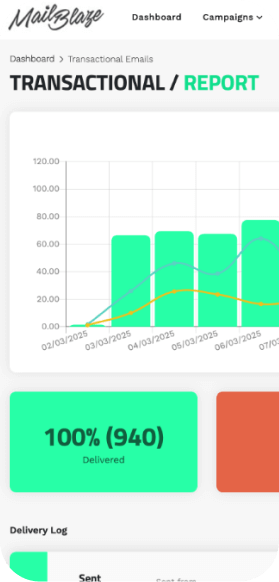
Monitor your critical messages. Resend when you need to.
Transactional reporting lets you track the delivery of your system emails: order confirmations, password resets, account alerts, and more. Monitor sent, delivered, opened, bounced, and failed volumes, and filter by specific transactional email type to drill into exactly what you need.
The delivery log shows the most recent send for each email type and lets you resend directly from the interface if needed. When a critical message has not arrived, the ability to act quickly matters.
Monitor your critical messages. Resend when you need to.
Transactional reporting lets you track the delivery of your system emails: order confirmations, password resets, account alerts, and more. Monitor sent, delivered, opened, bounced, and failed volumes, and filter by specific transactional email type to drill into exactly what you need.
The delivery log shows the most recent send for each email type and lets you resend directly from the interface if needed. When a critical message has not arrived, the ability to act quickly matters.
Monitor your critical messages. Resend when you need to.
Transactional reporting lets you track the delivery of your system emails: order confirmations, password resets, account alerts, and more. Monitor sent, delivered, opened, bounced, and failed volumes, and filter by specific transactional email type to drill into exactly what you need.
The delivery log shows the most recent send for each email type and lets you resend directly from the interface if needed. When a critical message has not arrived, the ability to act quickly matters.
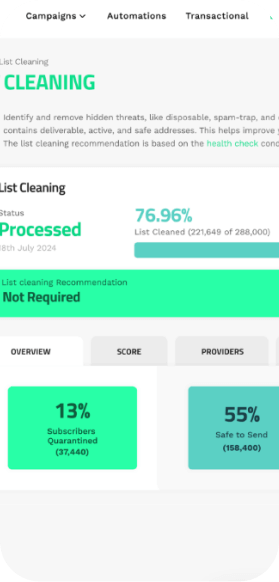
Know exactly what was in your list and why it was flagged.
After every list clean, a comprehensive report breaks down the results in full: subscriber scoring, inbox provider breakdown, deliverability ratings, threat levels, and the specific reasons each quarantined record was flagged.
This is not just a summary number. It is the insight to understand the quality of your data and make informed decisions about your list going forward. A cleaner list is a better-performing one, and the report shows you exactly what changed and why.
Know exactly what was in your list and why it was flagged.
Know exactly what was in your list and why it was flagged.
After every list clean, a comprehensive report breaks down the results in full: subscriber scoring, inbox provider breakdown, deliverability ratings, threat levels, and the specific reasons each quarantined record was flagged.
This is not just a summary number. It is the insight to understand the quality of your data and make informed decisions about your list going forward. A cleaner list is a better-performing one, and the report shows you exactly what changed and why.
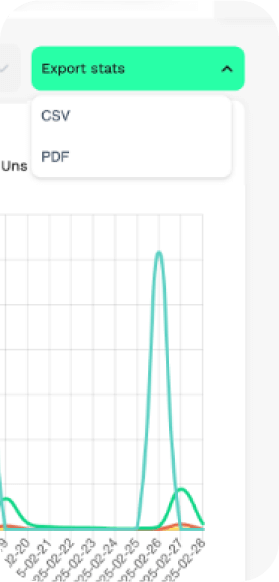
Your data, in the format you need, when you need it.
All Mail Blaze reports are exportable to CSV. Some are also available as PDF. Download your campaign data, automation performance, survey responses, transactional logs, or list cleaning results and incorporate them into your wider marketing reporting in whatever format works for your team.
Reporting that stays inside the platform is only useful to the people who log in. Exportable data means your email insights can feed into the broader decisions your team makes about your audience.
Your data, in the format you need, when you need it.
All Mail Blaze reports are exportable to CSV. Some are also available as PDF. Download your campaign data, automation performance, survey responses, transactional logs, or list cleaning results and incorporate them into your wider marketing reporting in whatever format works for your team.
Reporting that stays inside the platform is only useful to the people who log in. Exportable data means your email insights can feed into the broader decisions your team makes about your audience.
Your data, in the format you need, when you need it.
All Mail Blaze reports are exportable to CSV. Some are also available as PDF. Download your campaign data, automation performance, survey responses, transactional logs, or list cleaning results and incorporate them into your wider marketing reporting in whatever format works for your team.
Reporting that stays inside the platform is only useful to the people who log in. Exportable data means your email insights can feed into the broader decisions your team makes about your audience.
Can I export my reports?
Yes. All reports in Mail Blaze are exportable to CSV. Campaign reports and list cleaning reports are also available as PDF. Download from any report view and use the data in whatever wider reporting your team relies on.
When should I review my campaign reports?
We recommend waiting at least 72 hours after sending before drawing conclusions from campaign-level data. This gives your audience time to open and take action, so the numbers you are looking at reflect settled behaviour rather than the first few hours of activity.
What are comparative filters?
Comparative filters let you put two or more campaigns side by side and compare their performance across metrics like open rate, click rate, and clicks-to-open. This is how you identify what specifically drove a stronger result in one campaign over another, and replicate it. The term for this feature in Mail Blaze is "comparative filters", not "side-by-side comparisons".
Can I see engagement at subscriber level?
Yes. At subscriber level you can see which campaigns a specific subscriber has opened. Go to LISTS, select your list, search for the subscriber, click the cog wheel, and select CAMPAIGNS SEEN. This gives you individual engagement history for any subscriber on your list.
What does reporting cover across the platform?
Mail Blaze reporting covers: account-level dashboard, individual campaign performance, automation workflow reporting, survey response reporting, transactional email tracking and delivery logs, and list cleaning results. All in one platform, all exportable.
Can I export my reports?
Yes. All reports in Mail Blaze are exportable to CSV. Campaign reports and list cleaning reports are also available as PDF. Download from any report view and use the data in whatever wider reporting your team relies on.
When should I review my campaign reports?
We recommend waiting at least 72 hours after sending before drawing conclusions from campaign-level data. This gives your audience time to open and take action, so the numbers you are looking at reflect settled behaviour rather than the first few hours of activity.
What are comparative filters?
Comparative filters let you put two or more campaigns side by side and compare their performance across metrics like open rate, click rate, and clicks-to-open. This is how you identify what specifically drove a stronger result in one campaign over another, and replicate it. The term for this feature in Mail Blaze is "comparative filters", not "side-by-side comparisons".
Can I see engagement at subscriber level?
Yes. At subscriber level you can see which campaigns a specific subscriber has opened. Go to LISTS, select your list, search for the subscriber, click the cog wheel, and select CAMPAIGNS SEEN. This gives you individual engagement history for any subscriber on your list.
What does reporting cover across the platform?
Mail Blaze reporting covers: account-level dashboard, individual campaign performance, automation workflow reporting, survey response reporting, transactional email tracking and delivery logs, and list cleaning results. All in one platform, all exportable.
Go deeper on reporting

UTM codes and email marketing:Up your analytics
If you’re trying to understand more about the behaviour and actions your subscribers are taking after they receive your campaigns, UTM codes can help you do so.

Campaign tracking and reporting on Mail Blaze
After you send out your campaign, we know you'll want to monitor its performance. This article will explain why analytics are important for your email marketing strategy and show you which insightf...
Go deeper on reporting
UTM codes and email marketing:Up your analytics
If you’re trying to understand more about the behaviour and actions your subscribers are taking after they receive your campaigns, UTM codes can help you do so.
Campaign tracking and reporting on Mail Blaze
After you send out your campaign, we know you'll want to monitor its performance. This article will explain why analytics are important for your email marketing strategy and show you which insightf...
UTM codes and email marketing:Up your analytics
If you’re trying to understand more about the behaviour and actions your subscribers are taking after they receive your campaigns, UTM codes can help you do so.
Campaign tracking and reporting on Mail Blaze
After you send out your campaign, we know you'll want to monitor its performance. This article will explain why analytics are important for your email marketing strategy and show you which insightf...
Ready to see what is actually
driving your engagement?
Start your free trial and get access to full
reporting across every feature from day one.
No credit card required · Free AI credits to start
· Real support from day one · 14 days free
Ready to see what is actually
driving your engagement?
Ready to see what is actually
driving your engagement?
Start your free trial and get access to full
reporting across every feature from day one.
Start your free trial and get access to full
reporting across every feature from day one.
No credit card required · Free AI credits to start
· Real support from day one · 14 days free
Want to see it in action first?
Book a demo and we will walk you through this feature and everything else
Mail Blaze can do for your team. No pitch deck, no pressure.
Just a real conversation about your goals.
Want to see it in action first?
Want to see it in action first?
Book a demo and we will walk you through this feature and everything else
Mail Blaze can do for your team. No pitch deck, no pressure.
Just a real conversation about your goals.
Book a demo and we will walk you through this feature and everything else
Mail Blaze can do for your team. No pitch deck, no pressure.
Just a real conversation about your goals.