


In this article
How to Add Additional Lists to Your Campaign
To send your campaign to multiple lists, go to your draft campaign and click ADDITIONAL LISTS or SEGMENT on the DETAILS page.
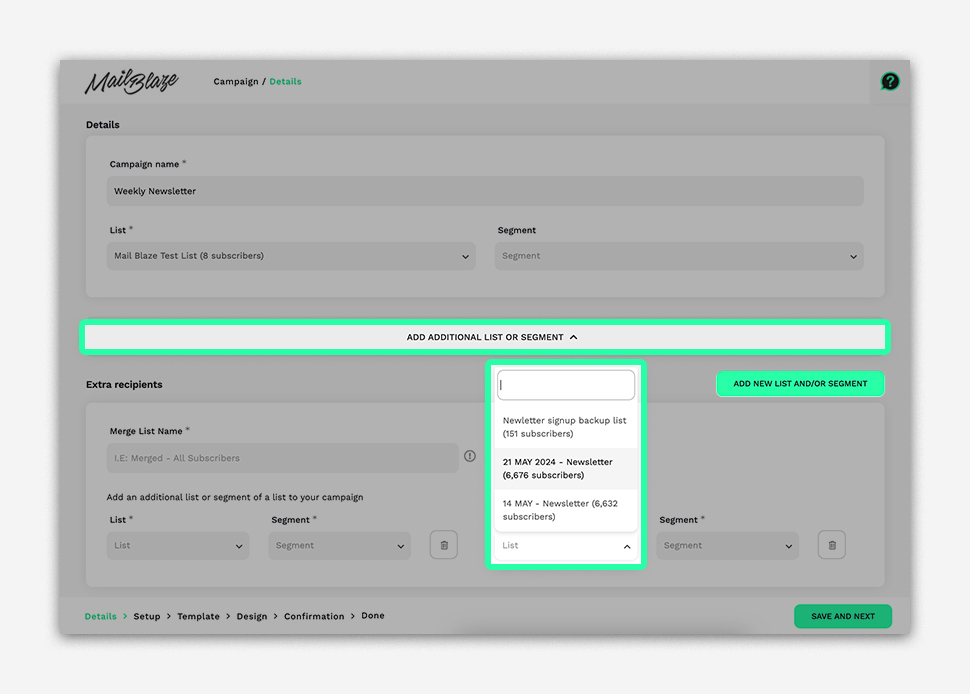
Click ADD NEW LIST and select another list. You can add multiple lists by clicking the ADD NEW LIST button.
Still haven't found what you are looking for?
Book a demo with us and see Mail Blaze in action, or reach out to our support team for expert assistance. We're here to help you every step of the way!
Still haven't found what you are looking for?
Still haven't found what you are looking for?
Book a demo with us and see Mail Blaze in action, or reach out to our support team for expert assistance. We're here to help you every step of the way!
Book a demo with us and see Mail Blaze in action, or reach out to our support team for expert assistance. We're here to help you every step of the way!