


In this article
How to Change the "From Email address" and "Reply To Email address"
When sending a campaign, the name and email address your subscribers see can influence how they engage with your message. If you need to update your “From Email Address” or “Reply-To Email Address,” you can make those changes in your mailing list settings. Follow the steps below to adjust these details.
Step 1
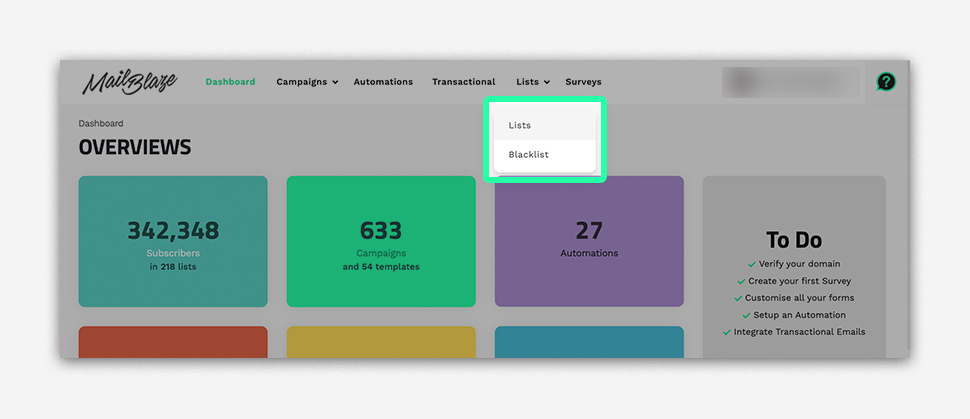
Navigate to LISTS in the dashboard.
Step 2
Click the list you’re sending the campaign from, then go to SETTINGS on the left side and click UPDATE LIST DETAILS.

Step 3
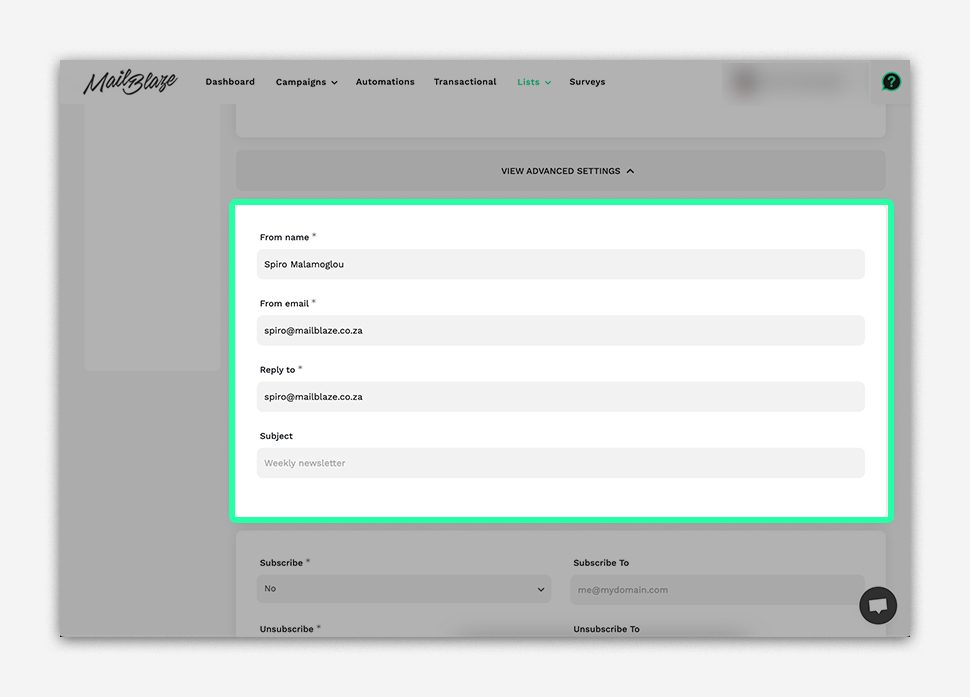
Scroll down and go to ADVANCED SETTINGS. From there you can edit the From Name and email address.
Alternate Way to Update the FROM and REPLY-TO Email Addresses
You can also change your FROM and REPLY-TO email addresses while creating your campaign. Simply go to the SETUP PHASE in the campaign wizard, update the details, and then click on SAVE AND NEXT.

Still haven't found what you are looking for?
Book a demo with us and see Mail Blaze in action, or reach out to our support team for expert assistance. We're here to help you every step of the way!
Still haven't found what you are looking for?
Still haven't found what you are looking for?
Book a demo with us and see Mail Blaze in action, or reach out to our support team for expert assistance. We're here to help you every step of the way!
Book a demo with us and see Mail Blaze in action, or reach out to our support team for expert assistance. We're here to help you every step of the way!