


In this article
How to Merge Your List
Want to combine two lists in your account? Merging a lists helps you to do that and ensure you’re not sending the same subscriber a campaign more than once. Let’s jump into it.
PLEASE NOTE: Merging a list creates a brand new list in your account that has it’s own unique subscription/unsubscription and profile journey
Step 1
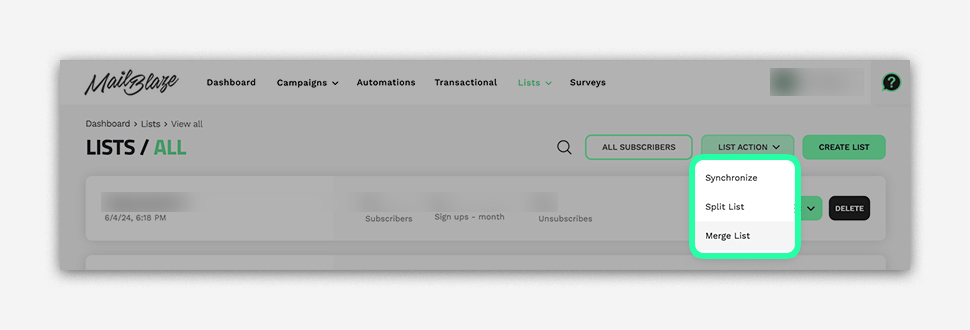
Go to LISTS > LISTS again and click LIST ACTION, then choose MERGE LIST.
Step 2
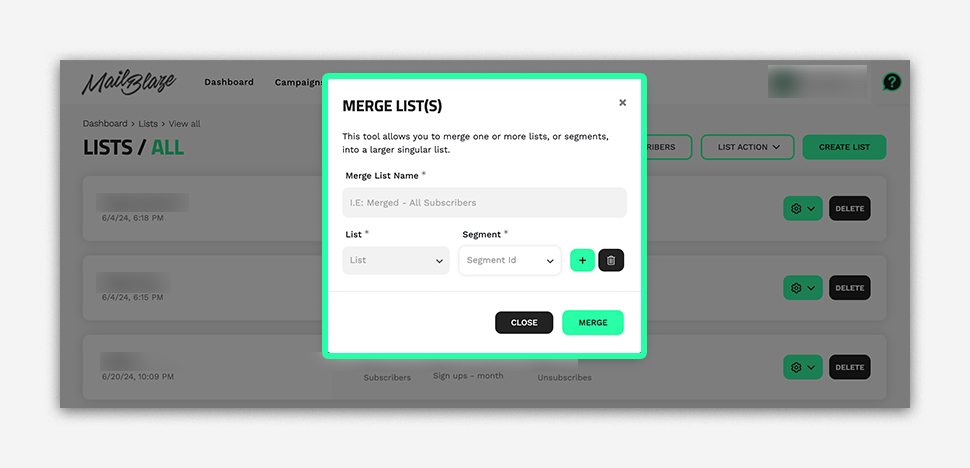
Add the MERGE LIST NAME.
Step 3
Select the LIST or SEGMENT, click the + icon to add more lists or segments, and then click the MERGE BUTTON once you have included all the lists or segments you wish to combine.
Still haven't found what you are looking for?
Book a demo with us and see Mail Blaze in action, or reach out to our support team for expert assistance. We're here to help you every step of the way!
Still haven't found what you are looking for?
Still haven't found what you are looking for?
Book a demo with us and see Mail Blaze in action, or reach out to our support team for expert assistance. We're here to help you every step of the way!
Book a demo with us and see Mail Blaze in action, or reach out to our support team for expert assistance. We're here to help you every step of the way!