


In this article
How to Schedule and Manage Your Campaign Sends
How to Schedule a Campaign Send
- Go to CAMPAIGNS and build your email. Make sure your subject line, content, links, and recipient list or segment are all ready.

- Go to the CONFIRMATION page.
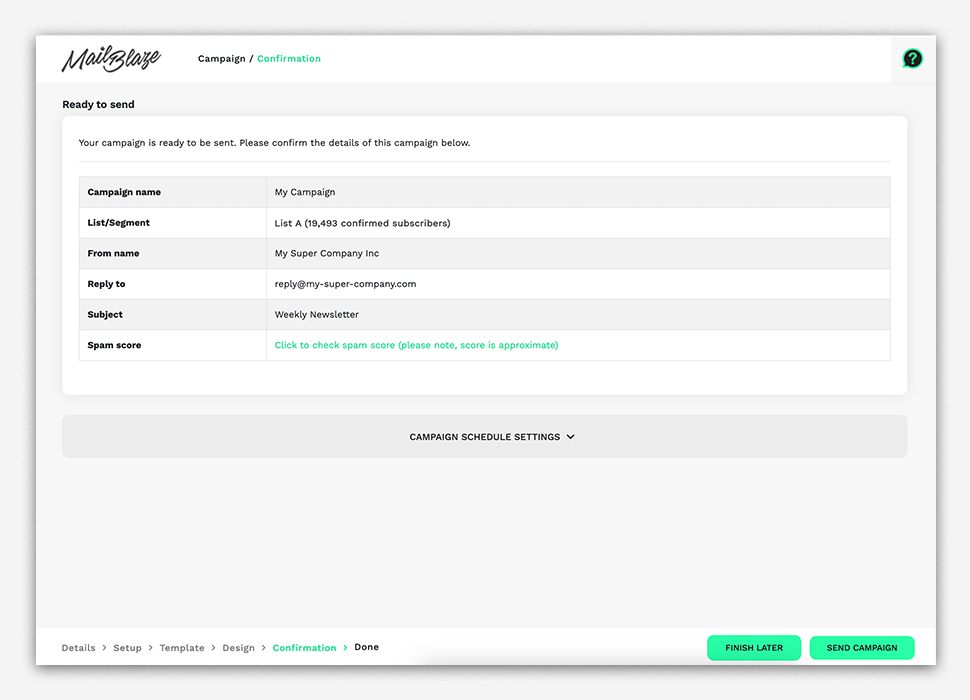
- Click on _CAMPAIGN SCHEDULE SETTINGS.

- Set the schedule by choosing your preferred date and time, and click SEND CAMPAIGN.
Always double-check your content, links, and list before scheduling.
How to Cancel a Scheduled Campaign
- Go to your scheduled campaign
- Click the gear icon next to it
- Select CANCEL SEND

This will stop the campaign so you can make changes or send something else instead.
Scheduling gives you more control and flexibility, helping you send campaigns at the right time without needing to be online.
Still haven't found what you are looking for?
Book a demo with us and see Mail Blaze in action, or reach out to our support team for expert assistance. We're here to help you every step of the way!
Still haven't found what you are looking for?
Still haven't found what you are looking for?
Book a demo with us and see Mail Blaze in action, or reach out to our support team for expert assistance. We're here to help you every step of the way!
Book a demo with us and see Mail Blaze in action, or reach out to our support team for expert assistance. We're here to help you every step of the way!