


In this article
How to Check Why a Subscriber Is Not Receiving Emails
If a subscriber says they are not receiving your email campaigns, there are a few things you can check in your Mail Blaze account before investigating further.
Follow the steps below to identify the issue and determine what needs to be done.
Step 1: Check Whether the Subscriber Is on Your Mailing List
First, confirm that the subscriber's email address is included in the list you selected when sending the campaign.
- Log in to your Mail Blaze account. Navigate to LIST > LIST.

- Click on ALL SUBSCRIBERS

- Click on SEARCH CRITERIA and type the recipient's email address.
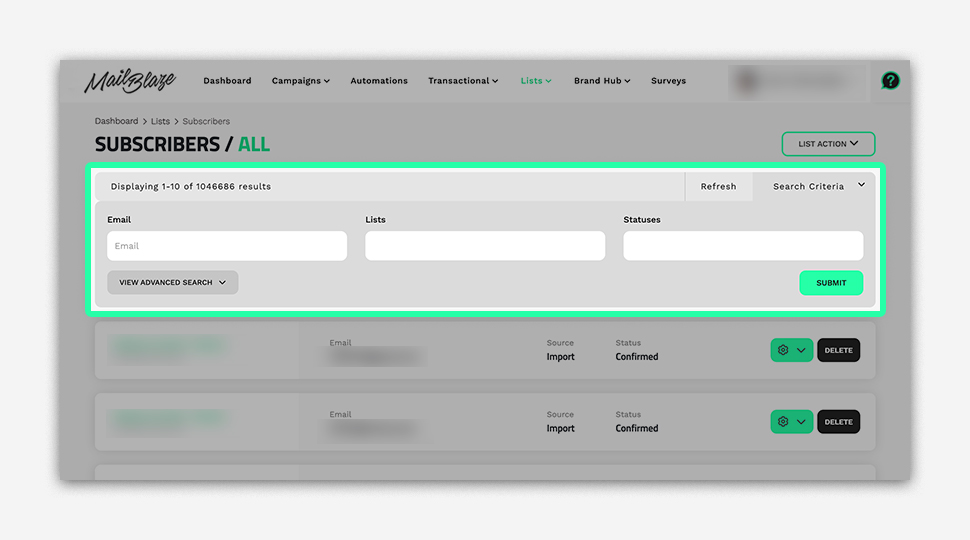
- Confirm that the subscriber belongs to the list selected for the campaign.
If the subscriber is not on the list: Add them to the appropriate list, provided you have the necessary permission or consent to email them.
If the subscriber is on the list: Continue to Step 2.
Step 2: Check Whether the Subscriber Is Unsubscribed or Blacklisted
If the subscriber is on the correct list but has not received your campaign, check their subscription status.
Search for the email address in the relevant Unsubscribed and Blacklist sections of your Mail Blaze account.
The next steps depend on the subscriber's status.
Step 3: What to Do If the Subscriber Is on the Blacklist
If the email address appears on the blacklist, contact Mail Blaze Support for assistance.
Please provide the affected email address and explain that the subscriber is not receiving your campaigns. Our support team can investigate the reason for the blacklist entry and determine whether the address can be removed.
Important: An address may have been blacklisted because of previous delivery failures or other sending issues. Removing it from the blacklist does not resolve the underlying cause of those failures. If the issue is not addressed, the address may be blacklisted again.
Do not repeatedly attempt to send campaigns to the address without investigating the reason for the previous failures.
Step 4: What to Do If the Subscriber Has Unsubscribed
If the email address appears in the Unsubscribed section, the subscriber will not receive your campaigns.
To receive emails again, the subscriber must explicitly choose to resubscribe.
You can share your subscription form with the subscriber so they can submit their email address and provide consent to receive your campaigns again.
Once they have completed the form, check that their subscription status has been updated before including them in future campaigns.
Important: Do not manually add an unsubscribed contact back to your mailing list or change their status without their consent. The subscriber must actively choose to receive your emails again.
Frequently Asked Questions
Why is a subscriber not receiving my campaign even though they are on my mailing list?
Check whether the subscriber is unsubscribed or blacklisted. If neither applies, further investigation may be needed to identify a delivery issue.
Can I remove a subscriber from the blacklist myself?
Please contact Mail Blaze Support. Our team can investigate the reason for the blacklist entry and assist with removal where appropriate.
Can I add an unsubscribed subscriber back to my mailing list?
The subscriber must first explicitly resubscribe. Share your subscription form so they can provide consent to receive your emails again.
Why was the subscriber blacklisted again after it was removed?
The original delivery issue may still exist. For example, the recipient's mail server may continue rejecting emails. Contact Mail Blaze Support to investigate the bounce reason before attempting to send again.
What if the subscriber is on the correct list and is neither unsubscribed nor blacklisted?
Check the campaign report for delivery errors or bounces. If you cannot identify the cause, contact Mail Blaze Support and provide the recipient's email address, the campaign name, and the approximate sending date.
Still Need Help?
If you have completed these checks and the subscriber is still not receiving your campaigns, contact Mail Blaze Support with the recipient's email address and the relevant campaign details. We can help investigate the issue.
Still haven't found what you are looking for?
Book a demo with us and see Mail Blaze in action, or reach out to our support team for expert assistance. We're here to help you every step of the way!
Still haven't found what you are looking for?
Still haven't found what you are looking for?
Book a demo with us and see Mail Blaze in action, or reach out to our support team for expert assistance. We're here to help you every step of the way!
Book a demo with us and see Mail Blaze in action, or reach out to our support team for expert assistance. We're here to help you every step of the way!